


Split Pay: Split Bills in Two
4.9476.00 Reviews
App Specs
- Version
- 2.0.4
- Updated On
- License
- Free
- Downloads
- 100,000+
- Developer
- Split Pay
- Categories
- Finance
- Platform
- Android
Screenshots
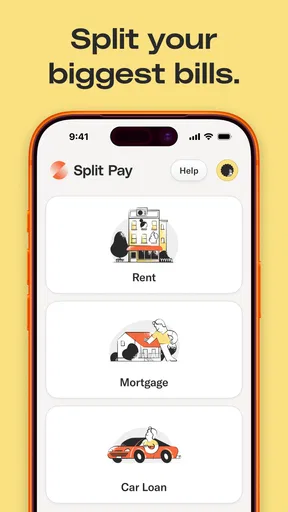
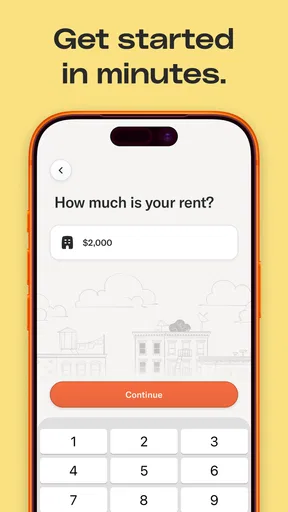
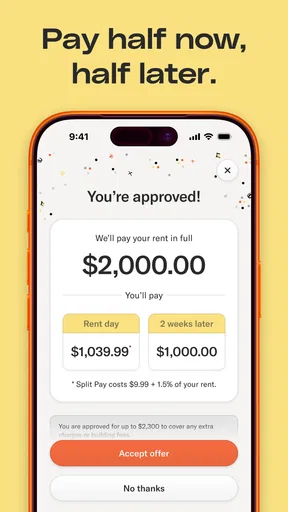
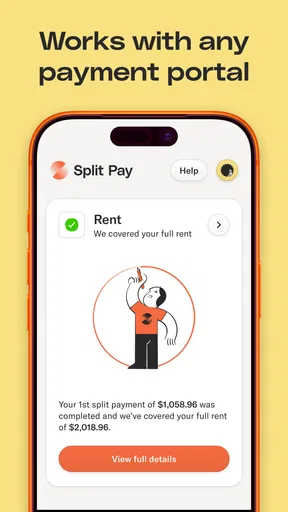
 Analysis by AppCompare
I look at rent-splitting apps through a practical lens: the payment schedule matters, but so do the choices a person can see and the confidence they have before connecting an account. Split Pay – Pay Rent in Two is a finance app from Visible Ideas, Inc. built around dividing rent into two payments. That focus could suit someone whose paydays and rent deadline fall awkwardly in the same month, but it is not a substitute for checking the exact terms and steps shown in the app before relying on it.
What to understand before connecting an account
The app is free to install, and its Everyone content rating makes it broadly accessible. It has a 4.8 average from around two thousand ratings, with more than one hundred thousand installs. Those figures suggest that many people have tried it, but they are not a guarantee that the arrangement will fit every lease, landlord, or personal budget. I would treat the app as a tool to investigate, not as permission to delay a rent payment without checking what happens in my own situation.
Start with the rent obligation, not the payment schedule
Before entering anything, I would check how my landlord expects rent to arrive: the accepted payment method, the due date, and whether the rent must arrive as one complete payment. Splitting the amount in an app does not automatically change the agreement with a landlord. If the landlord or property manager needs the full amount by a particular date, I would confirm that the app’s process can meet that requirement before counting on it.
This is also where I would compare the app’s displayed schedule with my actual cash flow. A two-part arrangement can make a month easier to manage only if both portions fit the money available on their respective dates. I would write down the dates beside paydays and essential bills rather than judging affordability from the smaller first payment alone. The second portion is still part of the same rent obligation.
Account access deserves a careful look
Connecting a financial account is a meaningful decision, not just another onboarding tap. I would read each permission or account-connection screen and consider whether the access described makes sense for the task I want to complete. I would also look for the app’s own explanations of how to manage or disconnect that connection, and review any account controls available before proceeding. If a request is unclear, I would pause and seek clarification rather than assume what it permits.
I would not treat a familiar interface, a large install count, or a strong average rating as proof of a particular security practice. Those signals can help me understand that the app is in use, but they do not replace reading the controls and disclosures shown to me. The developer, Visible Ideas, Inc., is identified with the app; the useful next step for a cautious user is still to inspect the information and choices presented during setup.
How the two-part approach fits everyday budgeting
Imagine rent is due near the beginning of the month, while income arrives in two portions. Paying the entire amount at once might leave too little for groceries and transport until the next payday. A split schedule could smooth that pinch if its dates line up with income and if the total remains affordable. I would put both scheduled payments into my budget from the start, then reserve the money for the later one instead of treating it as spare cash.
Worth Reading Before You Choose

EA SPORTS FC Mobile 26 Is a Bigger Football Game, but It Takes Time

Flipboard Shows What News Apps Must Do Beyond the Feed

Switching to Android Auto Means Rethinking Your Driving Routine

Google Calendar Makes a Crowded Week Easier to Manage

Ludo King Makes the Most of the Minutes Between Plans

Baby Panda World Brings Quick Play to Modern Phones, but Its Game Library Feels Busy
That last step is an easy one to miss. A smaller immediate payment can feel like extra breathing room, but it does not reduce what is owed. I would set aside the second portion as soon as practical and avoid using it to cover optional spending. If my income varies, I would plan around the lower amount I can reasonably expect, not an optimistic month; otherwise the split may move the stress rather than remove it.
Where it differs from familiar alternatives
The usual alternative is to pay rent directly through the landlord’s portal, bank transfer, or another method the landlord accepts. That can be simpler when I already have enough available on the due date, and it avoids adding a separate rent-splitting service to my routine. A budgeting app or spreadsheet can help me reserve money across paydays, but it does not itself arrange a split rent payment. The appeal here is the combination of a rent-focused split and a more manageable timetable, not a reason to abandon a direct payment method that already works well.
I would compare the actual dates, amounts, and any conditions presented in the app against the direct-payment option before choosing. The relevant question is not simply whether two payments sound easier than one; it is whether the complete arrangement leaves enough time and money for rent to be handled as required. If a direct payment is reliable and affordable, keeping it may be the cleaner choice. If timing is the problem, the split is worth evaluating on its exact terms.
Small checks that can prevent avoidable surprises
Before using the app for a real rent cycle, I would review the schedule from beginning to end and make sure I understand what I need to do at each step. I would check the payment dates against weekends, holidays, and my own bank balance, then keep a note of the confirmation or status shown after acting. This is not busywork: when rent is involved, a saved record makes it easier to distinguish a planned payment from one that has actually been completed.
I would also keep rent money separate in my own budget even if the app displays a plan or sends a reminder. A reminder can prompt me to act, but I would not use it as the only record of what I owe or as a replacement for checking payment status. If the app offers a history or account controls, I would review them after the first cycle to understand what is recorded and how to manage the account. The practical test is whether I can explain the next step and the remaining obligation without guessing.
Who is likely to benefit, and who should pause
I can see this being useful for renters whose income arrives at different points in the month and who are disciplined about setting money aside. It may also help someone who wants a rent-specific routine rather than manually moving money around in a general budgeting tool. The best fit is not simply someone who finds rent expensive; it is someone for whom splitting the timing solves a real cash-flow mismatch while still leaving the full amount covered.
I would be more cautious if my income is unpredictable, I am already behind on bills, or I tend to spend money that is no longer needed immediately. In those cases, a split can make the first date feel easier while making the later date harder. Someone who cannot meet the full rent obligation across the schedule should look for direct help from the landlord, a trusted housing adviser, or another appropriate source rather than assuming a payment-splitting app can solve an income shortfall.
Questions I would settle before relying on it
Can I use it with my landlord’s payment setup? I would not assume so; I would compare the app’s available process with the payment method and timing my landlord accepts. Does splitting change what I owe? I would plan on owing the full rent and treat the split only as a way of arranging its timing. Will a reminder ensure a payment happens? I would check the status myself and make sure I understand which actions are required.
What should I do if a date or amount does not work for my budget? I would avoid committing until I understand the available choices, and I would not rely on a hoped-for future paycheck to cover a fixed obligation. Can I stop using the app later? I would inspect the account-management and connection controls before starting so I know where to look if I decide to change course. These are not minor details: they determine whether a convenient-looking schedule is actually manageable for me.
A measured recommendation
My view is that the two-payment idea is most helpful when it addresses a specific timing gap, not when it disguises a rent shortfall. I would consider trying it only after checking the schedule, the landlord’s requirements, and the account choices presented during setup. If those line up, it could add structure to a difficult part of the month. If they do not, a direct payment plan or a personal budget may be more predictable.
The app is free, runs on Android 7.0 or later, and its current version is 1.7.15. It was released on December 5, 2023, and has gathered 291 written reviews alongside its broader rating count. I would use those details as context, then make the decision based on the terms and controls I can see for myself. For anyone considering it, the sensible first move is to map both portions onto a real monthly budget before making the first payment arrangement.
Getting Started with Ease
The moment you fire up the app, you’re greeted with an interface that’s as welcoming as your favorite coffee shop. It’s simple, clean, and doesn’t overwhelm you with unnecessary options. I found that the onboarding process was a breeze. You simply sign up, link your bank account, and you’re good to go. The app provides a straightforward guide, making sure you don’t miss a step. It’s like having a friendly guide walking you through the process.
The Magic of Splitting Payments
Now, onto the main event—splitting your rent. The concept here is beautifully simple yet incredibly effective. Split Pay – Pay Rent in Two allows you to divide your rent into two separate payments, spaced out over the month. This innovation can be a game-changer for anyone who struggles with budgeting. It feels like having a financial safety net, allowing you to manage your money with less stress.
To start, you just enter your total rent amount and the app automatically calculates the two payment dates and amounts. I was surprised at how seamless this process was. It’s as if the app reads your mind, knowing exactly what you need without any fuss. Plus, you get reminders before each payment, so there’s no chance of missing a due date.
Security and Peace of Mind
One of my initial concerns was security. Linking a bank account to an app can feel like a big deal. However, Split Pay – Pay Rent in Two uses bank-level encryption and security measures, which really put my mind at ease. They’ve clearly prioritized user security, which is something I truly appreciate. Having peace of mind when dealing with finances is priceless, and this app delivers on that front.
Added Features That Make a Difference
Beyond its core function, the app offers some neat features that enhance the overall experience. There’s a detailed history feature where you can track all your past payments, which I found incredibly useful for budgeting. You can also set up notifications to remind you of other bills, making it somewhat of a personal financial assistant.
Another cool feature is the ability to sync with other financial apps. If you’re like me and use multiple apps to keep track of your finances, this is a massive plus. It ensures that all your financial data is in one place, making it easier to manage.
Final Thoughts
In a world where financial stress can feel overwhelming, Split Pay – Pay Rent in Two stands out as a beacon of relief. It’s not just the functionality that impressed me, but the thoughtfulness in its design and features. It’s one of those rare apps that truly understands its users’ needs and delivers on its promises.
Whether you’re a college student trying to juggle expenses, a young professional managing your first apartment, or anyone who just needs a little extra help with rent, this app is a must-try. It’s like having a financial buddy that’s always there to lend a helping hand. So, go ahead and give it a whirl. Your future self will thank you.
Pros
- Easy to split rent between roommates.
- Secure payment processing system.
- User-friendly interface design.
- Supports multiple payment methods.
- Automated payment reminders.
Cons
- Limited to rent payments only.
- Requires all users to have the app.
- No offline payment options.
- Customer support can be slow.
- No integration with budgeting apps.
FAQs for Split Pay: Split Bills in Two
What is Split Pay – Pay Rent in Two and how does it work?
Split Pay – Pay Rent in Two is a financial app designed to help tenants manage rent payments by splitting them into two smaller, more manageable installments. Users connect their bank accounts, set up payment dates, and the app automatically handles the transactions, ensuring rent is paid on time. This helps alleviate the burden of large, single payments.
Is Split Pay – Pay Rent in Two secure to use?
Yes, security is a top priority for Split Pay. The app uses bank-level encryption and secure connections to protect user data. Additionally, it complies with financial regulations to ensure that sensitive information like bank details and personal data are kept safe and confidential at all times.
Can I use Split Pay – Pay Rent in Two for any type of rental property?
Split Pay is designed to be versatile and can be used for various rental arrangements, whether you’re renting an apartment, house, or even a room. However, it’s essential to check with your landlord or property manager to ensure they accept payments processed through the app.
Are there any fees associated with using Split Pay – Pay Rent in Two?
Split Pay may charge a nominal fee for its services, which covers the cost of processing payments and maintaining secure transactions. It’s advisable to review the app’s terms and conditions or reach out to customer support for detailed information about any potential fees before setting up your account.
What happens if I miss a payment date with Split Pay – Pay Rent in Two?
If you miss a payment date, the app will notify you and attempt to process the payment again. It’s crucial to ensure sufficient funds are available in your linked account to avoid late fees or penalties. The app’s customer support can also assist if you encounter issues with payment processing.


